
Zen Tuner: Effortless Chromatic Tuning for Musicians
Overview
Zen Tuner is a minimalistic chromatic tuner designed exclusively for iPhone and iPad, developed by Jean-Pierre Simard. The application serves as a reliable tool for musicians across skill levels, offering precise tuning support for a wide range of instruments, including woodwinds, brass, strings, and vocalists. Its primary purpose is to provide immediate and accurate pitch feedback to ensure instruments remain in tune during practice, rehearsal, or live performance. The app is particularly well-suited for on-the-go musicians who value simplicity, speed, and visual clarity in their tuning workflow.
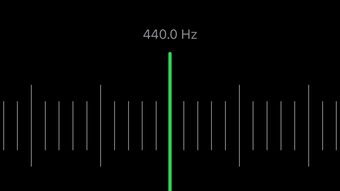
Designed with a clean interface, Zen Tuner focuses on essential functionality without distractions. The central display highlights the current note being detected, accompanied by a dynamic marker that shifts from red to green as the pitch approaches perfect tuning. This visual cue enables quick, intuitive adjustments, even in noisy environments. The app supports multiple tuning configurations, allowing users to customize their preferred notation (sharps or flats) and apply transposition with a single tap. These features enhance usability for multi-instrumentalists and performers who frequently switch between different tuning systems.
Given its focus on core functionality, Zen Tuner is ideal for musicians seeking a lightweight, dependable tuning solution without the complexity of feature-heavy alternatives. It operates seamlessly across various iPhone and iPad screen sizes, ensuring consistent performance regardless of device orientation or form factor. The developer did not provide additional system requirements, and exact performance details were not specified.
Key Features & Capabilities
- Chromatic Tuning Precision – Detects pitch across all 12 chromatic notes with high accuracy, ensuring instruments are tuned to standard A440 or custom frequencies.
- Real-Time Visual Feedback – A prominent, color-changing marker displays tuning status, shifting from red (sharp) to green (in tune), enabling immediate pitch correction.
- One-Touch Transposition – Allows quick adjustment of the reference pitch, useful for musicians switching between instruments with different tunings or playing in non-standard keys.
- Customizable Notation – Users can toggle between sharps and flats by tapping the main note, adapting the interface to personal or regional tuning preferences.
- Universal Device Compatibility – Optimized for all iPhone and iPad screen sizes, maintaining usability in both portrait and landscape orientations.
These features streamline the tuning process, reducing setup time and minimizing user error. For example, a guitarist preparing for a gig can quickly verify their instrument’s pitch using the visual marker, while a brass player can apply transposition to match a band’s tuning standard. The customization options allow users to tailor the app to their specific musical context, enhancing workflow efficiency. The developer did not specify additional features beyond those listed.
User Interface, Workflow & Performance
Zen Tuner presents a clean, uncluttered interface centered around the current note and tuning indicator. Navigation is intuitive, relying on minimal taps and gestures to access core functions. The main screen displays the detected pitch prominently, with the tuning marker positioned for immediate visual assessment. Users can adjust settings via a one-touch menu, which reduces interaction steps and supports rapid tuning sessions.
Workflow efficiency is enhanced by the app’s responsiveness and direct access to key tools. The ability to toggle between sharps and flats with a single tap ensures that users can align the interface with their preferred notation system without navigating complex menus. The app is designed to work seamlessly across different device sizes, maintaining consistent layout and functionality whether used on a compact iPhone or a larger iPad.
Performance observations are based on general software behavior patterns. The developer did not specify resource usage details, nor were exact CPU or RAM consumption metrics provided. Stability during prolonged use was not documented. However, the app’s lightweight size (13.4 MB) suggests efficient resource management, and its focus on core functionality may contribute to smooth operation.
Compatibility & System Requirements
Zen Tuner is compatible with iPhone and iPad devices running iOS. The software version is 2.1, released on July 5, 2024. The application occupies 13.4 MB of storage space upon installation. The developer did not specify minimum hardware requirements or exact OS version compatibility beyond the general platform support.
Compatibility information was partially provided. The app is optimized for all screen sizes and orientations, ensuring consistent usability across the Apple ecosystem. It is designed to function effectively on both older and newer devices within the supported range. The developer did not list specific processor, RAM, or iOS version requirements.
Pros and Cons
Pros
- Simple, intuitive interface ideal for quick tuning sessions
- Accurate chromatic pitch detection with clear visual feedback
- One-touch transposition for flexible tuning setups
- Customizable notation (sharps vs. flats) to suit user preferences
- Optimized for all iPhone and iPad screen sizes and orientations
Cons
- No information on advanced tuning modes or custom tuning presets
- Resource usage and performance metrics were not disclosed
- Limited to iOS devices; no support for Android or desktop platforms
- App functionality is basic; lacks features like metronome, recording, or tuning history
FAQ Section
Is Zen Tuner available for Android devices?
Zen Tuner is currently designed exclusively for iPhone and iPad, running on iOS. There is no official version available for Android platforms.
Is the app free to download and use?
Yes, Zen Tuner is available at no cost. The developer has released it as a free application with no in-app purchases or subscription fees.
Does Zen Tuner require an internet connection?
No, the app functions entirely offline. It uses the device’s microphone to detect pitch and does not require an internet connection to operate.
How often should I update Zen Tuner?
Updates are released periodically to improve performance, fix bugs, and ensure compatibility with new iOS versions. It is recommended to keep the app updated to the latest version for optimal functionality.
Can I use Zen Tuner with multiple instruments?
Yes, the app supports all standard instruments, including strings, brass, woodwinds, and vocals. The one-touch transposition feature makes it easy to switch between different tuning systems for various instruments.
Final Thoughts + CTA
Zen Tuner delivers a focused, reliable tuning experience tailored for musicians who value simplicity and precision. With its clean interface, responsive feedback, and thoughtful customization options, it stands out as a practical tool for both beginners and seasoned performers. While it lacks advanced features like metronomes or tuning logs, its core functionality is executed with clarity and efficiency.
For musicians who need a dependable, lightweight tuner on their iPhone or iPad, Zen Tuner is a strong choice. Its ability to adapt to different instruments and tuning preferences, combined with seamless device compatibility, makes it a valuable addition to any musician’s toolkit. The free pricing model further enhances its accessibility.
Download Zen Tuner now







